misc · October 14, 2026 · 3 min read
Install What You Really Use
Yes, the title sounds a bit obvious. Who installs tools they don’t use? I did, for a long time.
It started for a good reason. I once ran tee /etc/passwd by mistake while working in a Kali VM. I ended up with a broken system and a long list of things to configure again. Automating the setup made sense, so I wrote an Ansible project called secmachine-build.
Over time, that project became bigger than it needed to be. I installed everything I thought I might need someday. More tools, more configurations, more things to maintain. I was trying to cover too many areas of cybersecurity with a single machine, and most of the software wasn’t part of my daily work.
That work mostly happens inside VMs. I want them clean and light, not carrying a full arsenal I’ll probably never touch.
I still want a workstation I can rebuild without spending hours configuring it. I just don’t want to rebuild all that unnecessary stuff. So I reworked the project and called it pwnbox.
Installing Kali without the default toolsets
I start with a fresh minimal Kali installation. During the installer’s software selection step, I untick everything. No preselected collection of pentesting tools and no desktop environment I plan to replace later.
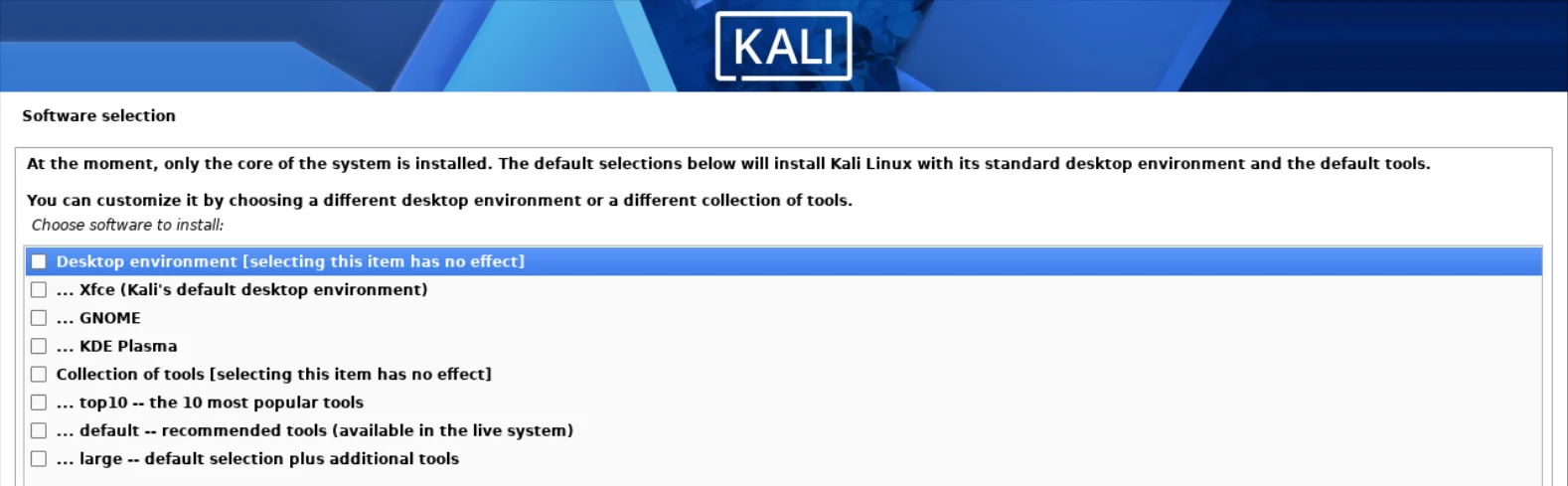
From there, I install what I actually use, including i3 and my own configurations. The point isn’t to make Kali as small as possible for the sake of it. It’s to know what’s on the machine and why it’s there.
That makes the setup personal. Someone focused on web testing won’t necessarily need the same tools as someone doing reverse engineering or Active Directory work. I don’t think there’s much value in installing all three toolsets by default just in case.
So pwnbox is not a new Linux distribution or a universal pentesting environment. It’s my way of turning a minimal Kali installation into my own workstation, with i3, the tools I use, and my configurations.
Provisioning the workstation with Ansible
I kept Ansible from the original project. The goal is still to avoid setting up the same environment by hand every time I create a VM.
Once Kali is installed, I run:
sudo apt update && sudo apt install -y ansible git makegit clone https://github.com/rh33t/pwnbox.git && cd pwnboxmake setup && sudo rebootThis is intended for a fresh minimal Kali VM only. The setup modifies system packages and configuration, so I take a snapshot before running it.
Ansible handles the installation and configuration instead of leaving me with a long checklist of manual steps. If I need to rebuild the VM, I run the same project again.
That doesn’t mean every run produces a byte-for-byte identical machine. Kali is a rolling distribution, and packages change. What I’m automating is my setup process and the set of choices behind it.
The code is available at rh33t/pwnbox.
I’m still using automation. I’m just asking it to do less, on purpose.